
Desktop 3D printers often force a choice.You either get beginner simplicity or enthusiast-level performance.
The Bambu Lab A1 attempts to bridge that gap. It combines high-speed capability with automation tools that reduce manual tuning. The result is a machine designed for both first-time users and experienced makers who value efficiency.
Build and Design Specifications
The A1 keeps a compact footprint without sacrificing structural stability.
Measuring 465 × 410 × 430 mm and weighing 8.3 kg, it fits comfortably on most desks or workbenches. The steel and extruded aluminum frame adds rigidity, which is essential when printing at higher speeds.
This balance between portability and structural integrity makes it practical for home studios, classrooms, or small workshops.
Build Volume and Work Area
The 256 × 256 × 256 mm build volume provides a true 10 × 10 × 10-inch workspace.
That size is sufficient for:
- Functional mechanical parts
- Decorative multi-piece models
- Prototypes and small product enclosures
- Cosplay accessories and hobby builds
It offers flexibility without increasing the machine’s physical footprint beyond desktop-friendly dimensions.
Motion System Architecture
The A1 uses a bed-slinger Cartesian system.
While not as mechanically complex as CoreXY systems, this design remains proven and reliable. It simplifies maintenance and makes troubleshooting easier, especially for new users.
For many users, predictability and serviceability outweigh experimental mechanics.
Performance Capabilities
Speed is one of the defining characteristics of the A1.
- Maximum print speed: 500 mm/s
- Acceleration: up to 10,000 mm/s²
- Nozzle temperature: up to 300°C
- Filament diameter: 1.75 mm
- Standard nozzle: 0.4 mm
- Optional nozzles: 0.2 mm, 0.6 mm, 0.8 mm
The 300°C hotend expands material compatibility beyond basic PLA. Faster acceleration improves corner sharpness and reduces overall print time without excessive ringing.
For users focused on productivity, these numbers translate into real-world time savings.
Material Compatibility
Out of the box, the A1 supports:
- PLA
- PETG
- TPU
- PVA
These materials cover most hobby, prototyping, and functional printing needs.
However, abrasive filaments such as carbon fiber blends require a hardened nozzle upgrade. This is a common limitation across many printers in this category and not unique to the A1.
Automation and Smart Features
Where the A1 distinguishes itself is automation.
Fully automatic calibration handles:
- Bed leveling
- Z-offset tuning
- Vibration compensation
This eliminates much of the trial-and-error traditionally associated with first-layer setup. For beginners, this reduces frustration. For experienced users, it speeds up workflow.
Active Monitoring Systems
The printer includes multiple safeguards:
- Filament run-out detection
- Tangle detection
- Active flow rate compensation
These systems prevent failed prints and maintain extrusion consistency. Fewer interruptions mean less wasted material and time.
Safety and Convenience
Power-loss recovery allows prints to resume after an outage.
Wi-Fi connectivity integrates with Bambu Studio for remote job management. A built-in camera enables monitoring without being physically present. This level of connectivity aligns the A1 with modern workflow expectations.
User Interface
A 3.5-inch IPS touchscreen provides responsive control. The interface is clear and functional. It avoids unnecessary complexity while still giving access to essential settings and feedback.
Multi-Color Capability
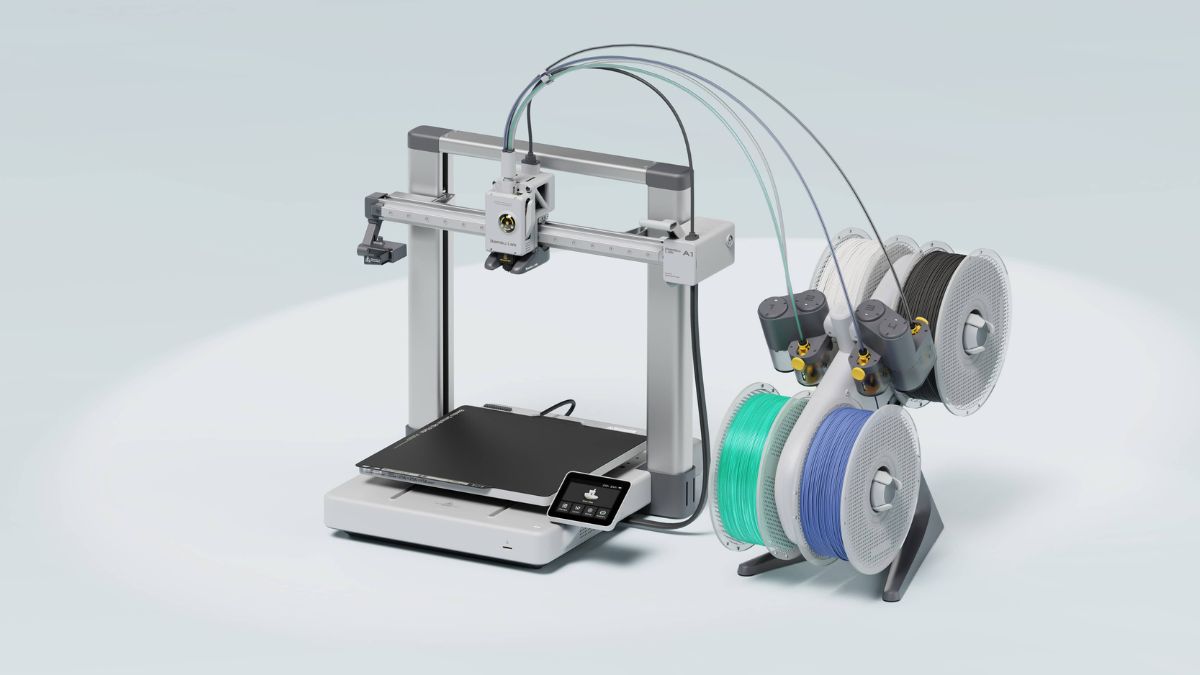
The A1 supports multi-color printing through the optional AMS Lite system. This Automatic Material System enables color switching without manual intervention. The Combo version bundles the AMS Lite for users who want multi-material capability from the start.
For single-color users, the base model keeps costs lower and workspace requirements minimal.
Electrical Requirements
The printer operates on 100–240V AC input. Maximum power consumption reaches approximately 1300W at 220V. This remains within standard household circuit limits in most regions.
Practical Strengths and Trade-Offs
The A1 focuses on usability without stripping away performance.
Key strengths include:
- High-speed printing with stable frame construction
- Extensive automatic calibration
- Remote monitoring and connectivity
- Quiet operation suitable for shared environments
Limitations are straightforward:
- Multi-color printing requires AMS Lite unless buying the Combo
- Abrasive materials need a hardened nozzle upgrade
These are manageable considerations rather than structural weaknesses.
For users entering 3D printing or upgrading from slower entry-level machines, the A1 offers a compelling balance. It prioritizes automation and speed without complicating the learning curve.